How to Handle COI Requests Faster Without Losing Accuracy
Validating insurance policy data means confirming that every field in a policy, application or certificate request matches its source documents and that the coverage is in force. It is done in three layers: check the core identifying fields, reconcile them against an authoritative record, and route every mismatch to a person who decides. Doing this by hand across inboxes, PDFs and management systems is slow and inconsistent. Acord AI’s Policy IQ automates the comparison and exception-flagging steps and keeps a person in charge of the decision.
This guide is written for Canadian agencies, MGAs, brokers and carriers. It covers what to validate, where the reference data comes from, how to catch discrepancies, and where automation fits.
Start with the fields that identify who is insured, what is insured, for how long and with whom. Canadian law already gives a useful baseline. Under Ontario’s Compulsory Automobile Insurance Act, the particulars of an auto insurance contract that must be disclosed after an accident are the insured’s name and address, the vehicle’s make, model and serial number, the contract’s effective and expiry dates, the insurer’s name, the insurer’s agent’s name if there is one, and the policy number.
That list is written for accident disclosure, but it works as a minimum validation set for any personal or commercial lines file. If any of these fields is wrong, nearly everything downstream is affected: a mistyped serial number breaks a vehicle match, a wrong expiry date misstates whether coverage is in force, and a wrong named insured can undermine a certificate or a claim.
Beyond the identifying fields, teams usually add a second tier that depends on the line of business:
The order matters. Validate identity and term fields before coverage detail, because a coverage comparison against the wrong risk or the wrong term is wasted work.
A field is valid only when it agrees with something independent of the entry itself. Re-reading your own agency management system record and finding it consistent proves nothing. The reference should be one of the following.
The declarations page, the policy wording and every endorsement are the primary evidence of what was issued. Validation here means comparing the extracted data with the issued document line by line: names, dates, limits, deductibles and forms attached. This is the step where discrepancies between what was quoted, what was requested and what was issued tend to appear.
The second comparison is against what the client asked for. A policy can be internally consistent and still not match the request. Checking issued coverage against the request catches missing coverage parts, wrong limits and omitted interests before the client does.
For auto, Canadian industry bodies provide records that act as independent checks. The Insurance Bureau of Canada describes its Insurance Validation Program, used by the Ontario and Newfoundland and Labrador governments, as a digital service that verifies that a vehicle identification number (VIN) matches the registration information on file and confirms that mandatory auto coverage has been purchased. It is a public-private arrangement that gives provinces real-time confirmation that mandatory coverage exists.
The legislation behind this is explicit. Ontario’s Act says the Ministry of Transportation shall not issue, validate or transfer a vehicle permit unless it is satisfied that the vehicle is insured, and it allows the Minister to verify information by comparing it with information collected under the Highway Traffic Act (Compulsory Automobile Insurance Act, s. 13). For an insurance team, the practical lesson is that accurate VIN, insured and policy-term data on your side is what allows these government checks to succeed.
Several IBC services support the checks above. The IBC’s insurance data tools page describes them as follows:
| Tool | What it provides | Typical use in validation |
|---|---|---|
| DASH | A policy and claims information system with detailed reports on a consumer’s auto insurance history, including policies, claims and other information used to provide a quote | Confirming prior coverage and claims history against what an applicant disclosed |
| VIN Verify | A free service that checks whether a vehicle has been reported as flood-damaged and non-repairable by participating IBC member insurers | Screening a vehicle before quoting or binding |
| VINlink | A decoder used to validate VIN accuracy | Catching transcription errors in the serial number |
Two points on using them well. First, each tool answers a narrow question. A history report tells you what the record shows about prior policies and claims; it does not tell you whether the policy you are about to issue is built correctly. Second, results only help if they are compared against the file systematically. A report sitting in a folder beside a quote is not a validation.
For broker-channel data, Canada also has a shared standard. As ACORD and CSIO described in their 2015 announcement, CSIO eDocs is a secure, auditable, system-based standard for delivering policy documents directly from insurers to broker management systems, supporting data quality and consistency. CSIO, which represents property and casualty insurers, software providers and more than 35,000 brokers, oversees technology standards such as eDocs, eDelivery and eSignatures, and operates CSIOnet, an industry-owned platform for exchanging policy information in the broker channel. Where a carrier delivers documents this way, the data arrives in a consistent structure that is easier to compare automatically.
The process below applies to a new quote, a renewal or an incoming policy document. Each step names what it takes and where it commonly goes wrong.
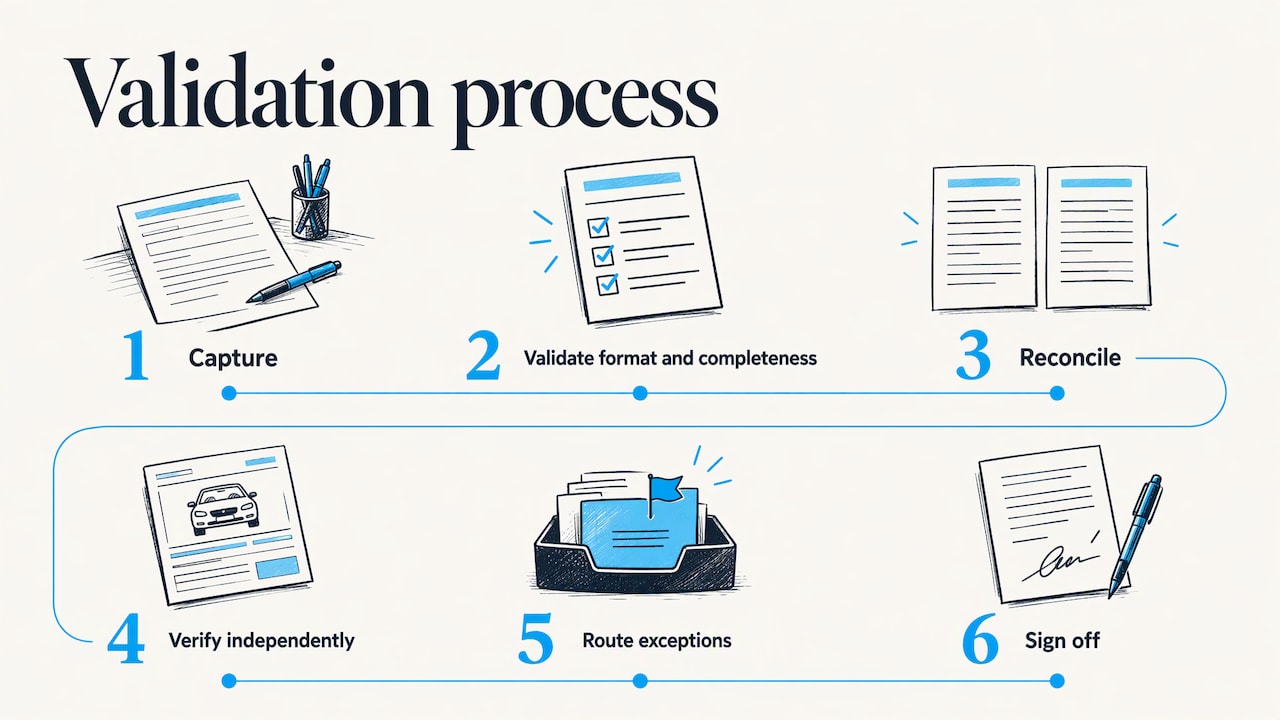
Pull the fields out of the source document, whether it is a PDF attached to an email, a scanned declarations page or a carrier download. The common failure is partial capture: staff transcribe the headline fields and skip endorsements, schedules and notes, where the surprises often sit. Acord AI’s document analysis and Inbox IQ handle incoming emails and attachments so the data starts in a structured form rather than in someone’s memory.
Before comparing anything, check that required fields exist and look right: a policy number in the carrier’s format, dates in a valid order, a serial number of the expected length. This step catches the cheapest errors. Where it goes wrong is in tolerating blanks, because a missing value that nobody flags will later look like a confirmed one.
Compare the extracted data with the application, the quote and the issued policy. Look for differences in named insureds, addresses, vehicles or locations, limits, deductibles and endorsements. Manual comparison is where fatigue costs the most, since two documents can differ by a single digit or a single sub-limit. Policy IQ performs policy checking and comparison and identifies exceptions, so the person reviewing starts from a list of differences rather than from two documents side by side.
For auto risks, run the VIN through a decoder and use the relevant industry reports to confirm history and coverage status. For commercial risks, the independent reference is usually the certificate, the contract requirement or the client’s schedule of assets. The failure to avoid is verifying once and never again: coverage status changes with cancellations, endorsements and lapses.
Every mismatch needs an owner, a reason code and an outcome: corrected, accepted with a note, or escalated to the carrier or client. Without this, the same discrepancy resurfaces at renewal. Acord AI supports workflow configuration, so exception handling can follow the routing rules an agency already uses.
A person confirms the file is clean or the exception is accepted. This is also the step where regulatory expectations are met in practice. The Ontario Auditor General’s 2025 value-for-money audit notes that FSRA regulates insurance companies and agents for compliance with the Insurance Act and licence requirements, so a documented review trail is part of operating as a licensed intermediary or insurer in Ontario.
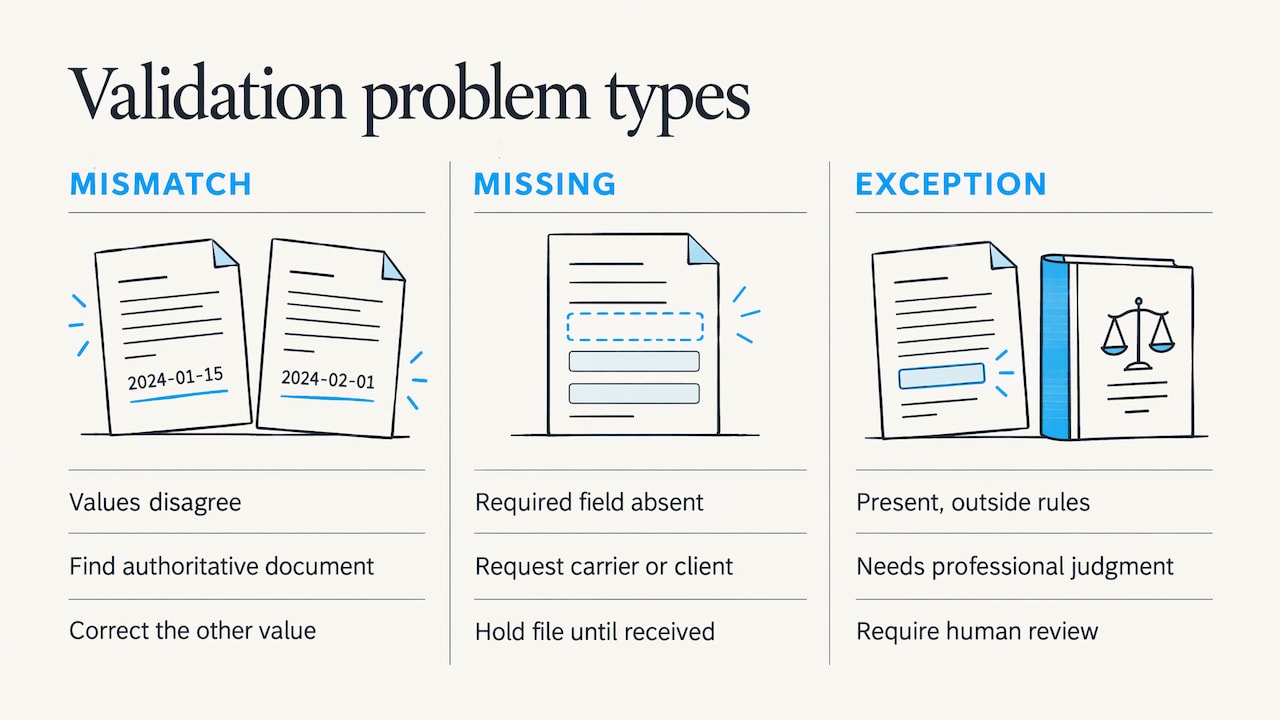
The most useful distinction in validation is between three kinds of problem, because each one needs a different response.
Mismatches are values that exist in two places and disagree: an expiry date on the declarations page that differs from the quote, or a deductible that changed between versions. The response is to establish which document is authoritative and correct the other.
Missing information is a field that should be present and is not: no lienholder on a financed vehicle, no additional insured where a contract requires one, no endorsement attached that the quote promised. The response is to request it from the carrier or client and hold the file until it arrives.
Exceptions are values that are present and consistent but outside what your rules expect: a limit below the contract requirement, an exclusion that a client’s lender would not accept, or an endorsement that narrows coverage. These need judgment rather than correction.
A workable rule for when a person should review: automate the detection of all three, and require human review for anything that changes coverage, affects a certificate holder’s rights or alters what the client was told. Routine matches can pass with a logged result. That split is the reason Acord AI pairs automation with human oversight: the system surfaces the discrepancy, and the licensed professional decides what it means.
Validation is not a single checkpoint. The same fields reappear at each stage, and errors that survive one stage are inherited by the next.
For teams wiring these stages together, our guide to insurance workflow automation explains how to sequence them. If underwriting criteria are part of your checks, insurance underwriting guidelines describes what they cover and how to apply them.
A broker receives a renewal package for a small fleet. The expiring policy lists eight vehicles. The renewal declarations list eight vehicles, but one serial number differs from the prior term by a single character, and a hired and non-owned auto endorsement that was on the expiring policy is not on the renewal.
A manual reviewer reading both documents may well catch the endorsement, because it is a visible line item, and miss the transposed character. A structured comparison flags both as differences. The serial number is a mismatch: the reviewer checks it against the vehicle registration and corrects it with the carrier. The missing endorsement is an exception: the broker contacts the client to confirm whether the coverage was intended to continue and, if so, asks the carrier to reinstate it. Both outcomes are logged. The certificate the client’s customer holds is then checked against the corrected policy.
Nothing in this example requires a judgment from software. It requires that the differences be found reliably and that the person with the authority to decide is the one who sees them.
Agencies that measure validation tend to follow a handful of indicators. Choose the ones that match your volume and set your own baselines before you change the process:
The goal is not zero exceptions. It is that exceptions are found early, before a quote goes out or a certificate is issued, and that each one has a recorded outcome.
Policy data validation is often treated as clerical work, and that is why it fails. The comparison is repetitive, the documents are inconsistent, and the cost of a miss appears months later at a claim or an audit.
We built Acord AI around a different division of labour. Software should read the documents, compare them, and identify discrepancies and exceptions across policies, forms, quotes and certificates. People should decide what those findings mean for the client. That is why human review is part of the workflow rather than an add-on.
We also think validation belongs inside the workflow, not beside it. When the same validated data feeds Policy IQ, Forms IQ, Quotes IQ and Cert IQ, and the platform integrates with the industry systems teams already use, a correction made once does not have to be made again at the next stage.
The teams that gain most are those with high volumes of repetitive checks and little time to do them carefully. Configurable workflows let them apply their own rules to that work.
the author
Acord AI is a subscription platform for agencies, MGAs, brokers and carriers, with solutions covering email management, policy checking and comparison, ACORD form preparation, quoting and certificate handling. Policy IQ is the module built for the comparison and exception-identification steps described above, and every finding stays subject to human review. You can see the full range on the solutions page, read the Policy IQ workflow guide, or start from Acord AI to arrange a demo.
Teams with security questions can review the security and privacy page before a demo.
At least the insured’s name and address, the vehicle make, model and serial number, the effective and expiry dates, the insurer, the agent if any, and the policy number. These are the particulars Ontario’s Compulsory Automobile Insurance Act lists for post-accident disclosure. Other provinces have their own rules, so confirm requirements with the provincial regulator.
Compare the policy term dates on the issued document with the carrier’s record, and check for any later cancellation or endorsement. For mandatory auto coverage in Ontario and Newfoundland and Labrador, the IBC’s Insurance Validation Program is the mechanism governments use to confirm coverage against VIN and registration data. Your own file should carry the same VIN and term data, accurately entered.
The IBC describes DASH as a policy and claims information system that produces detailed reports on a consumer’s auto insurance history, including policies, claims and other information used to provide a quote. It is useful for comparing a client’s disclosed history with the recorded history. It does not replace checking the policy you are issuing against the application.
Any finding that changes coverage, affects a certificate holder, or differs from what the client was told should be reviewed by a licensed professional. Exact matches and format checks can pass with a logged result. A good rule is that software detects and a person decides.
Yes, when automation handles reading, comparison and exception identification, and people retain the decision. Standards such as CSIO eDocs, which deliver policy documents to broker systems in a consistent, auditable form, make automated comparison easier. Acord AI’s platform combines automated checks with human review and integrates with industry systems.


One Platform. Smarter Insurance Operations. Start Your Journey Today.